
Tutorial 2: Quality control
Emanuel Michele Soda
Istituto Europeo Oncologia (IEO), Milano, Italyemanuelsoda@gmail.com
Elena Ceccacci
Istituto Europeo Oncologia (IEO), Milano, Italyelena.ceccacci@ieo.it
2026-10-25
Source:vignettes/Tutorial_2_Quality_control.Rmd
Tutorial_2_Quality_control.RmdAbout this tutorial
Before looking for hits, check that the screen worked: that every sample was sequenced deeply enough, that the library was not lost, and that replicates agree. A problem found here (a failed replicate, a bottleneck) would otherwise produce false hits later.
This is the second of three tutorials. It starts from the object built in 1. Getting your data into ScreenR:
data(count_table)
data(annotation_table)

counts <- count_table
colnames(counts) <- c(
    "Barcode", "Time1", "Time2", "Time3_TRT_A", "Time3_TRT_B", "Time3_TRT_C",
    "Time3_CTRL_A", "Time3_CTRL_B", "Time3_CTRL_C",
    "Time4_TRT_A", "Time4_TRT_B", "Time4_TRT_C",
    "Time4_CTRL_A", "Time4_CTRL_B", "Time4_CTRL_C"
)
counts <- filter(counts, Barcode != "*")
groups <- factor(c(
    "T1/T2", "T1/T2",
    rep("Time3_TRT", 3), rep("Time3_CTRL", 3),
    rep("Time4_TRT", 3), rep("Time4_CTRL", 3)
))

object <- create_screenr_object(
    table = counts, annotation = annotation_table, groups = groups
)
object <- remove_all_zero_row(object)
object <- normalize_data(object)
object <- compute_data_table(object)
Many plots accept a palette, one color per sample. Here
replicates of the same condition share a color:
palette <- c(
    "#66c2a5", "#fc8d62", rep("#8da0cb", 3), rep("#e78ac3", 3),
    rep("#a6d854", 3), rep("#ffd92f", 3)
)| Step | Question | Functions |
|---|---|---|
| 1 | Was each sample sequenced deeply enough? |
mapped_reads(), plot_mapped_reads()
|
| 2 | Are the counts distributed similarly in all samples? | plot_mapped_reads_distribution() |
| 3 | How many barcodes were lost? |
barcode_lost(), plot_barcode_lost(),
plot_barcode_lost_for_gene()
|
| 4 | Do replicates agree? | plot_replicate_correlation() |
| 5 | Is the library still evenly represented? |
compute_gini(), plot_gini()
|
| 6 | Do samples cluster by condition? |
plot_mds(), plot_pca(),
plot_explained_variance()
|
| 7 | Which normalization should I use? | normalize_data() |
Step 1: sequencing depth
The number of reads assigned to barcodes in each sample.
mapped_reads(object)
#> # A tibble: 14 × 2
#>    Sample         Mapped
#>    <fct>           <int>
#>  1 Time1        10671757
#>  2 Time2         9799724
#>  3 Time3_TRT_A   6824877
#>  4 Time3_TRT_B   9107354
#>  5 Time3_TRT_C   9717868
#>  6 Time3_CTRL_A  9485195
#>  7 Time3_CTRL_B  9016812
#>  8 Time3_CTRL_C  9568624
#>  9 Time4_TRT_A   8933915
#> 10 Time4_TRT_B   9883209
#> 11 Time4_TRT_C  12325124
#> 12 Time4_CTRL_A 10351136
#> 13 Time4_CTRL_B  9180192
#> 14 Time4_CTRL_C  9315365
plot_mapped_reads(object, palette = palette) +
    theme(axis.text.x = element_text(angle = 45, hjust = 1))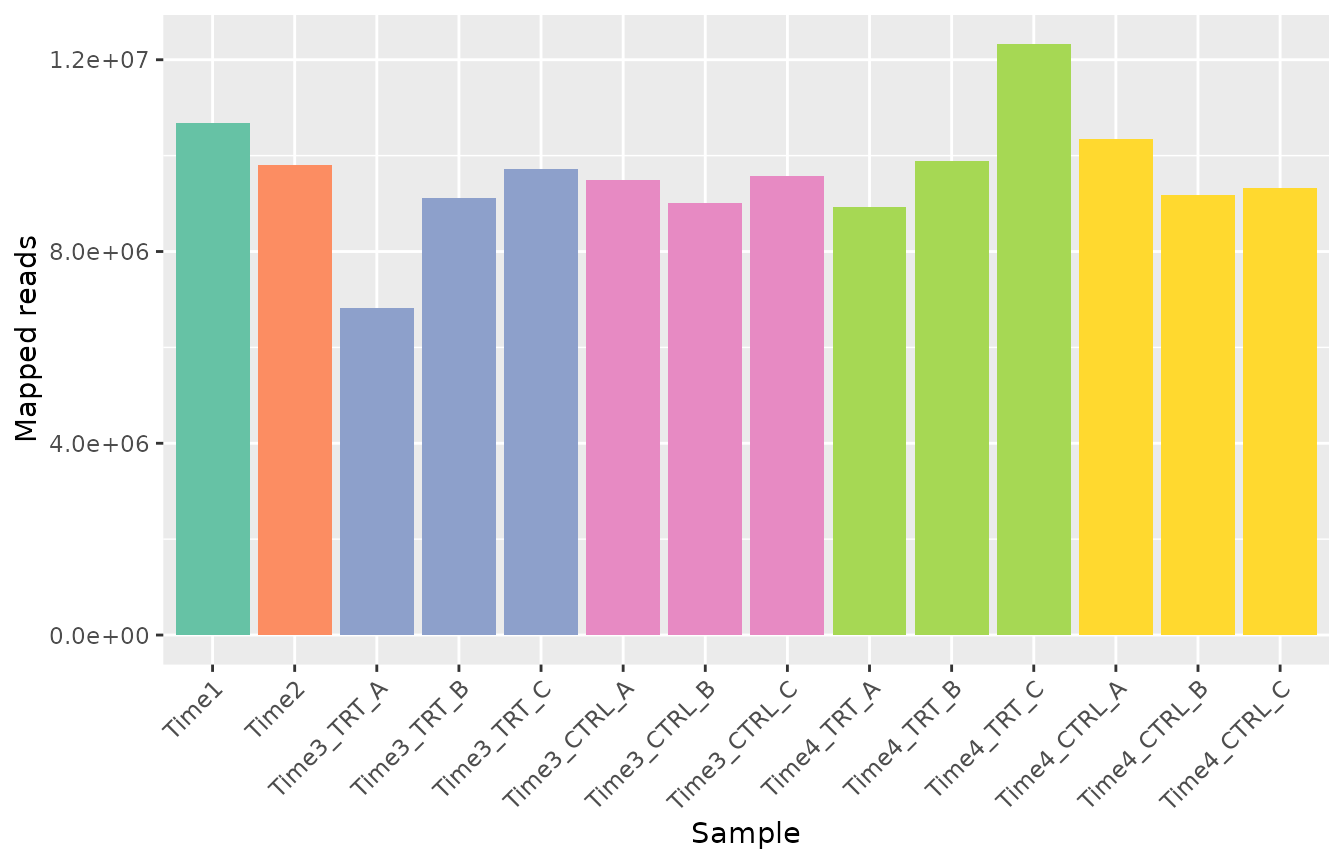
What to look for. All samples should have a similar
number of reads, and enough for the size of the library: a common rule
of thumb is at least a few hundred reads per barcode on average (here
about 5300 barcodes, so about 1.5 million reads or more). A sample with
far fewer reads than its replicates is less reliable. Different depths
are corrected by the normalization; very low depth is not. Here every
sample has between about 7 and 12 million reads;
Time3_TRT_A has fewer reads than its replicates but still
more than 1000 per barcode, which is enough.
Step 2: distribution of the counts
plot_mapped_reads_distribution(object, palette = palette,
    alpha = 0.8, type = "boxplot"
) +
    theme(axis.text.x = element_text(angle = 45, hjust = 1))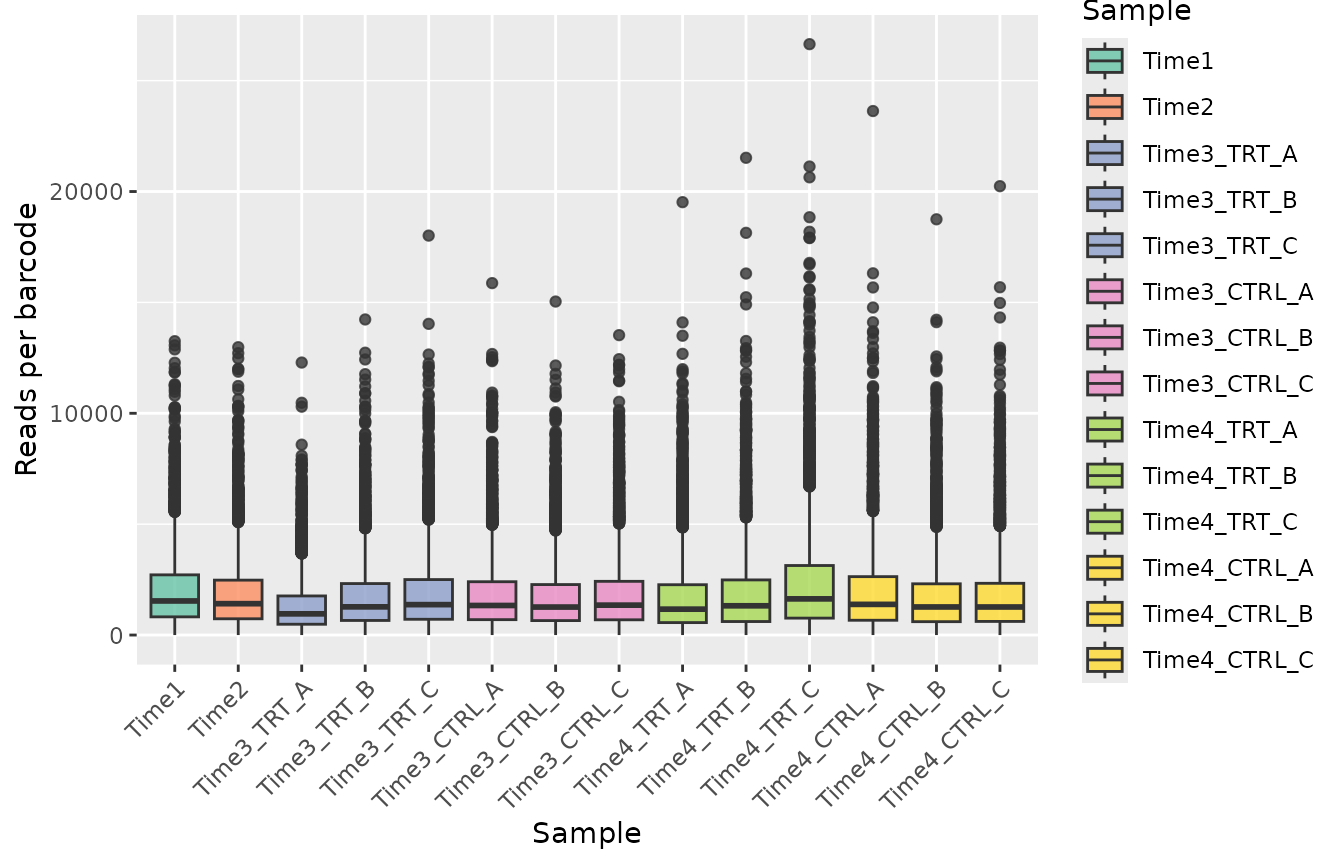
plot_mapped_reads_distribution(object, palette = palette,
    alpha = 0.4, type = "density"
)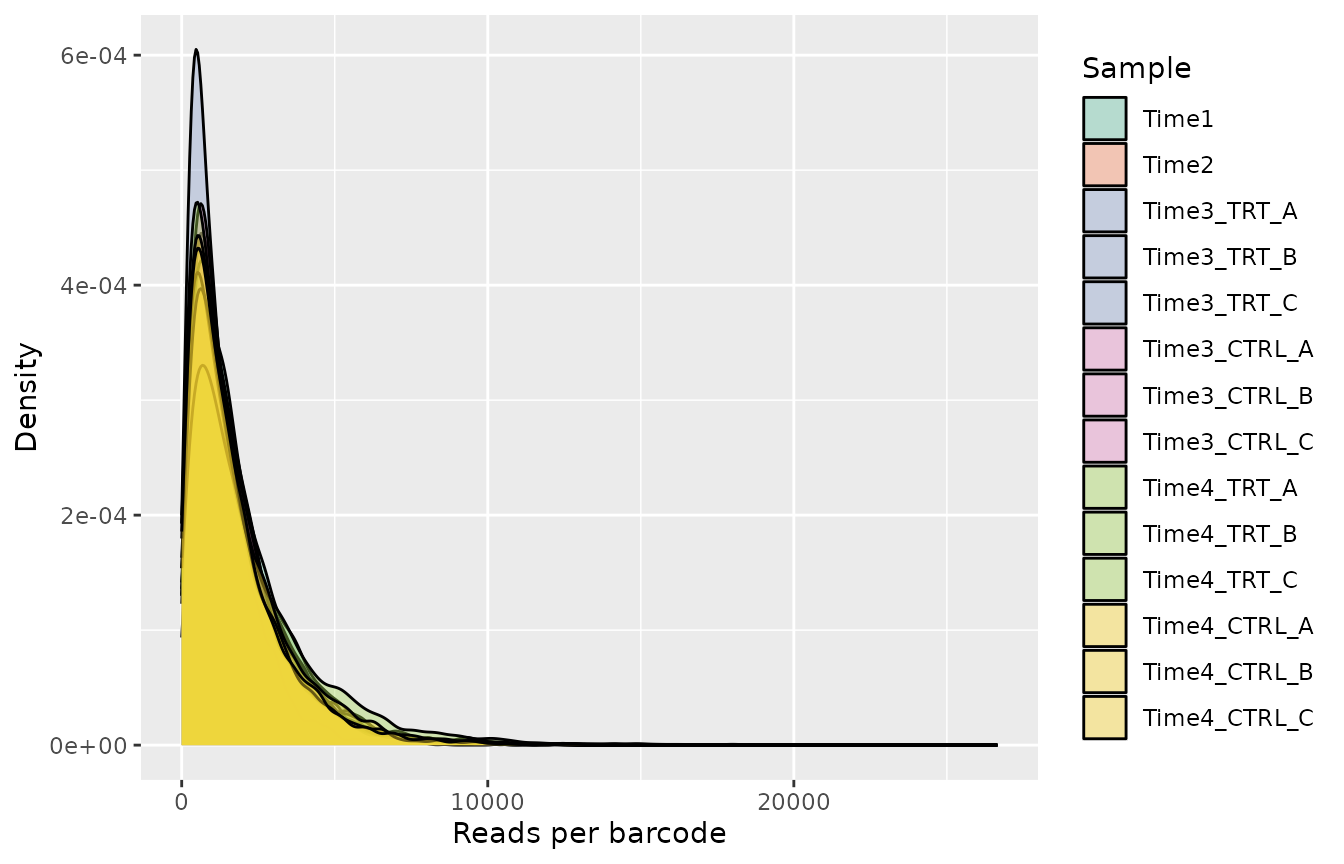
What to look for. The distributions should have a similar shape. A sample whose distribution is much wider or shifted may have had a technical problem (for example during PCR amplification).
Step 3: lost barcodes
A barcode is lost in a sample when it has zero reads. Some loss over time is expected in a dropout screen; a large loss means that the library was not represented well enough (too few cells per barcode).
barcode_lost(object)
#> # A tibble: 14 × 2
#>    Sample       LostBarcode
#>    <fct>              <int>
#>  1 Time1                  2
#>  2 Time2                 18
#>  3 Time3_TRT_A           24
#>  4 Time3_TRT_B           25
#>  5 Time3_TRT_C           24
#>  6 Time3_CTRL_A           6
#>  7 Time3_CTRL_B           2
#>  8 Time3_CTRL_C          20
#>  9 Time4_TRT_A            8
#> 10 Time4_TRT_B           70
#> 11 Time4_TRT_C           58
#> 12 Time4_CTRL_A          45
#> 13 Time4_CTRL_B          34
#> 14 Time4_CTRL_C          51
plot_barcode_lost(object, palette = palette) +
    theme(axis.text.x = element_text(angle = 45, hjust = 1))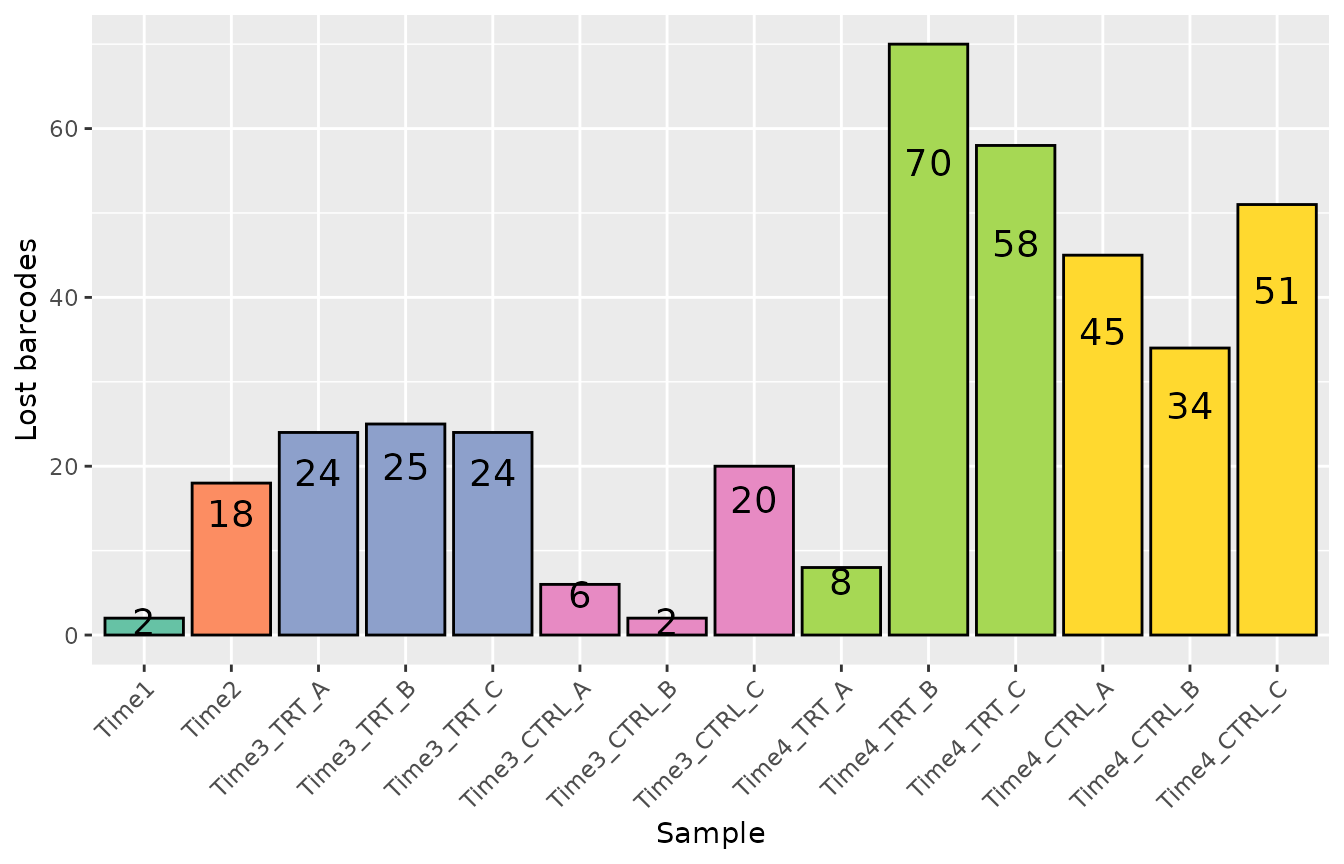
To see which genes lost barcodes in some samples:
plot_barcode_lost_for_gene(object, samples = c("Time3_TRT_A", "Time4_TRT_A"))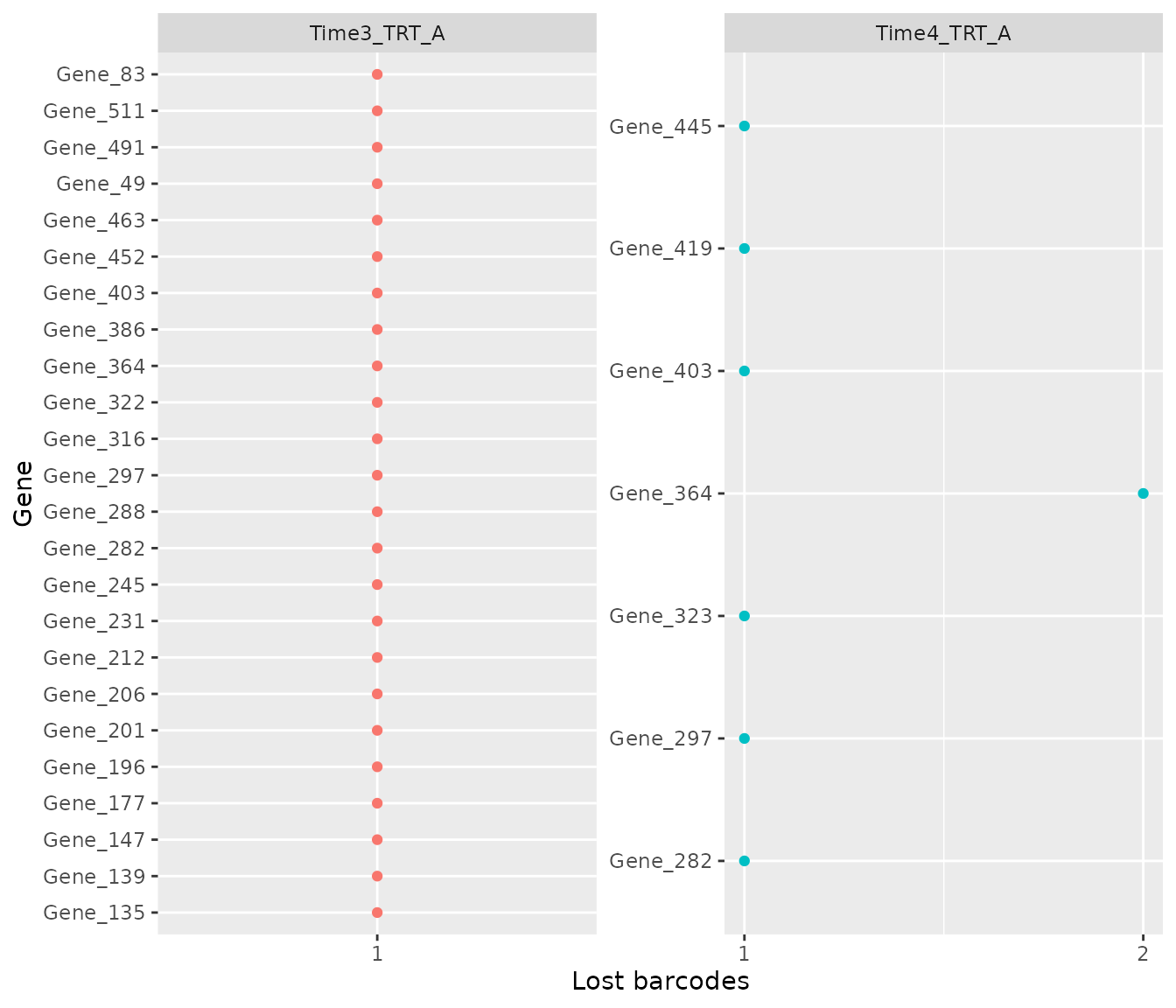
What to look for. A few lost barcodes per sample are normal. A gene that lost most of its barcodes in all samples, including the controls, was not represented well and its results are unreliable.
Step 4: agreement between replicates
plot_replicate_correlation() shows the correlation of
the log2 counts per million between every pair of samples.
plot_replicate_correlation(object)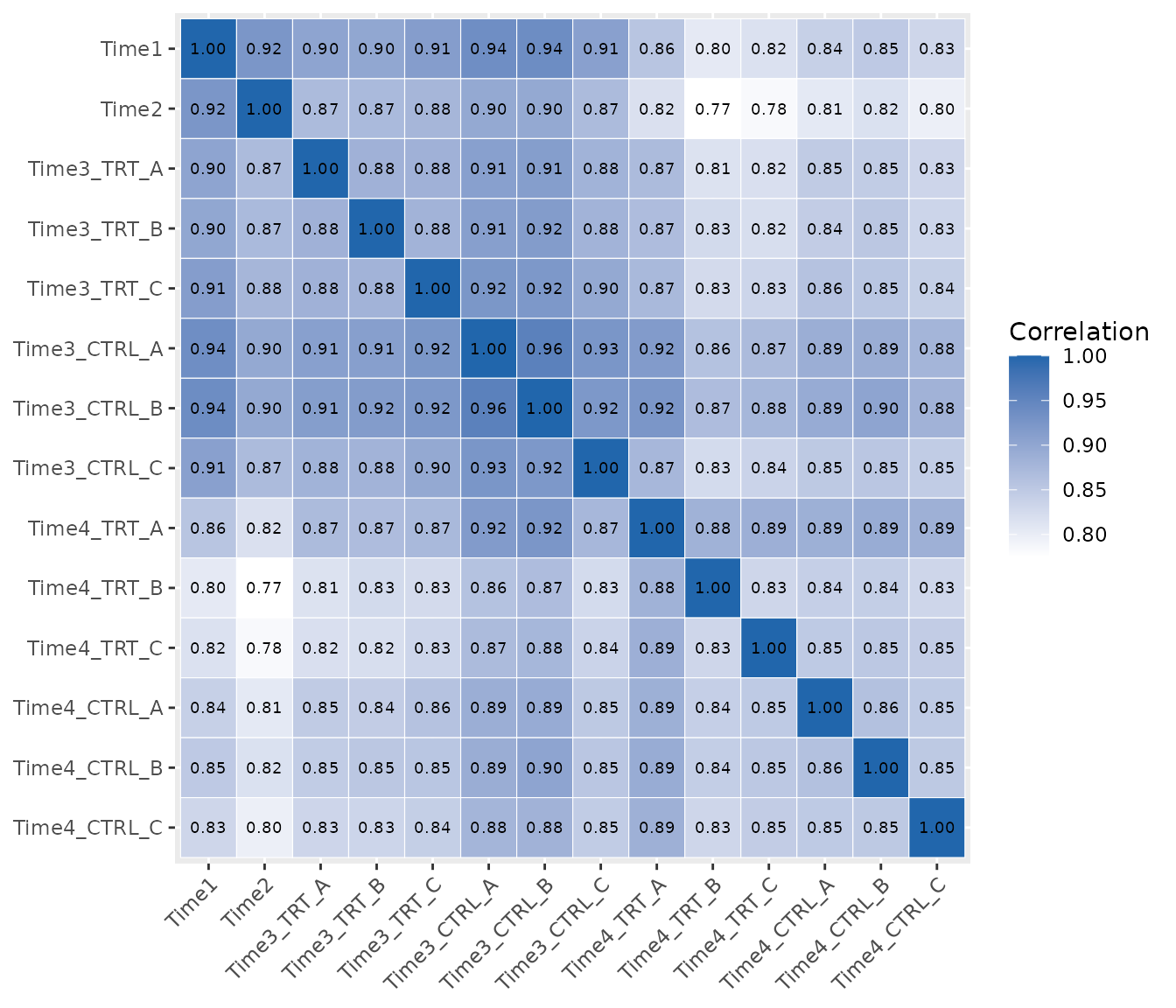
What to look for. Replicates of the same condition (the blocks along the diagonal) should be the most correlated samples. A replicate with a low correlation to its partners may be an outlier: check it in the next plots before deciding whether to remove it.
Step 5: evenness of the library
The Gini index measures how unevenly the reads are spread over the barcodes: 0 means that every barcode has the same number of reads, 1 that a single barcode has all of them.
compute_gini(object)
#> # A tibble: 14 × 2
#>    Sample        Gini
#>    <fct>        <dbl>
#>  1 Time1        0.420
#>  2 Time2        0.434
#>  3 Time3_TRT_A  0.444
#>  4 Time3_TRT_B  0.445
#>  5 Time3_TRT_C  0.443
#>  6 Time3_CTRL_A 0.437
#>  7 Time3_CTRL_B 0.440
#>  8 Time3_CTRL_C 0.444
#>  9 Time4_TRT_A  0.477
#> 10 Time4_TRT_B  0.482
#> 11 Time4_TRT_C  0.482
#> 12 Time4_CTRL_A 0.470
#> 13 Time4_CTRL_B 0.466
#> 14 Time4_CTRL_C 0.471
plot_gini(object, palette = palette)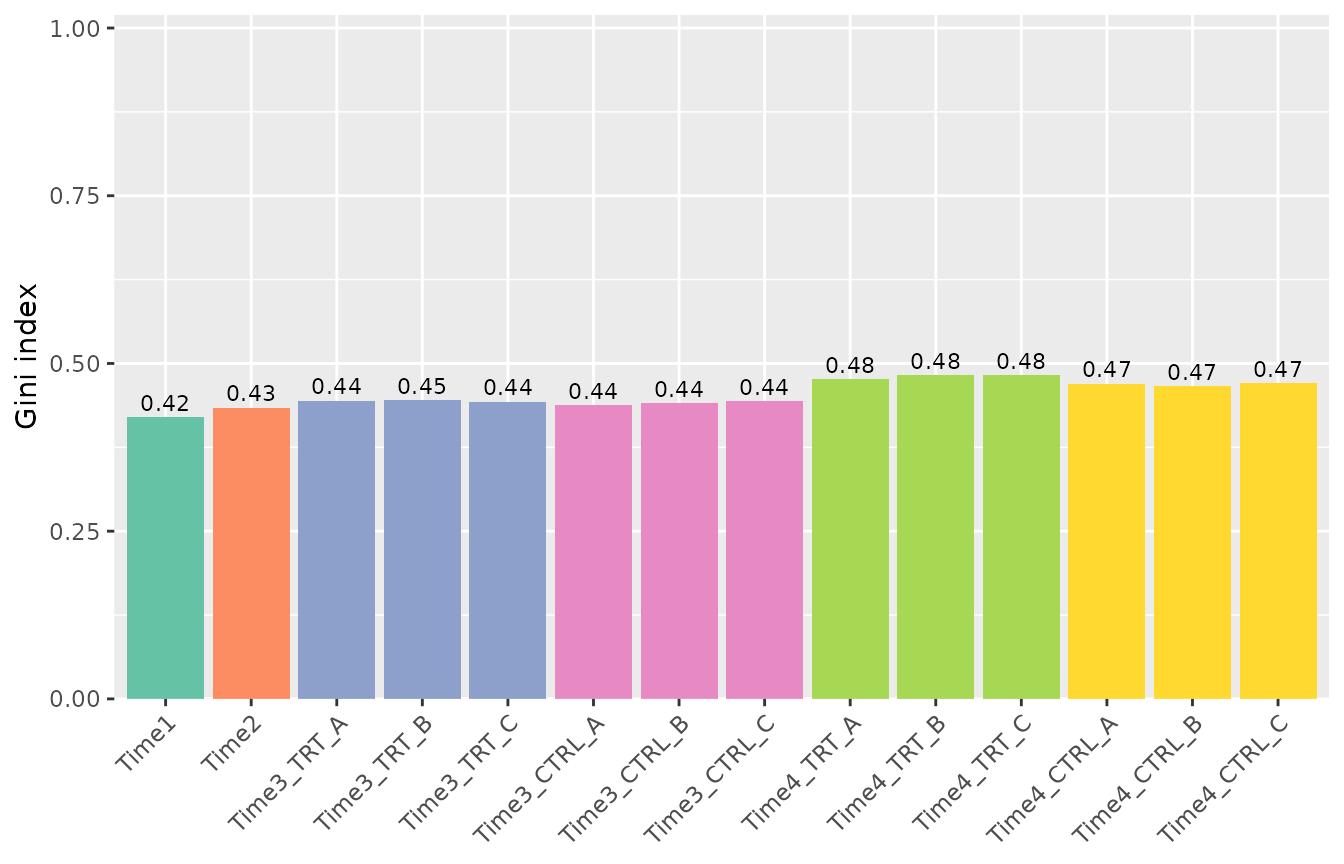
What to look for. In a dropout screen the Gini index usually increases slowly over time, as some barcodes are depleted. A sudden jump, or a large difference between replicates, suggests a bottleneck (too few cells were kept at some step). Here it increases from about 0.42 to 0.48: a normal trend.
Step 6: overall structure of the samples
The multidimensional scaling (MDS) plot places similar samples close to each other. By default the points are labelled by sample:
plot_mds(object)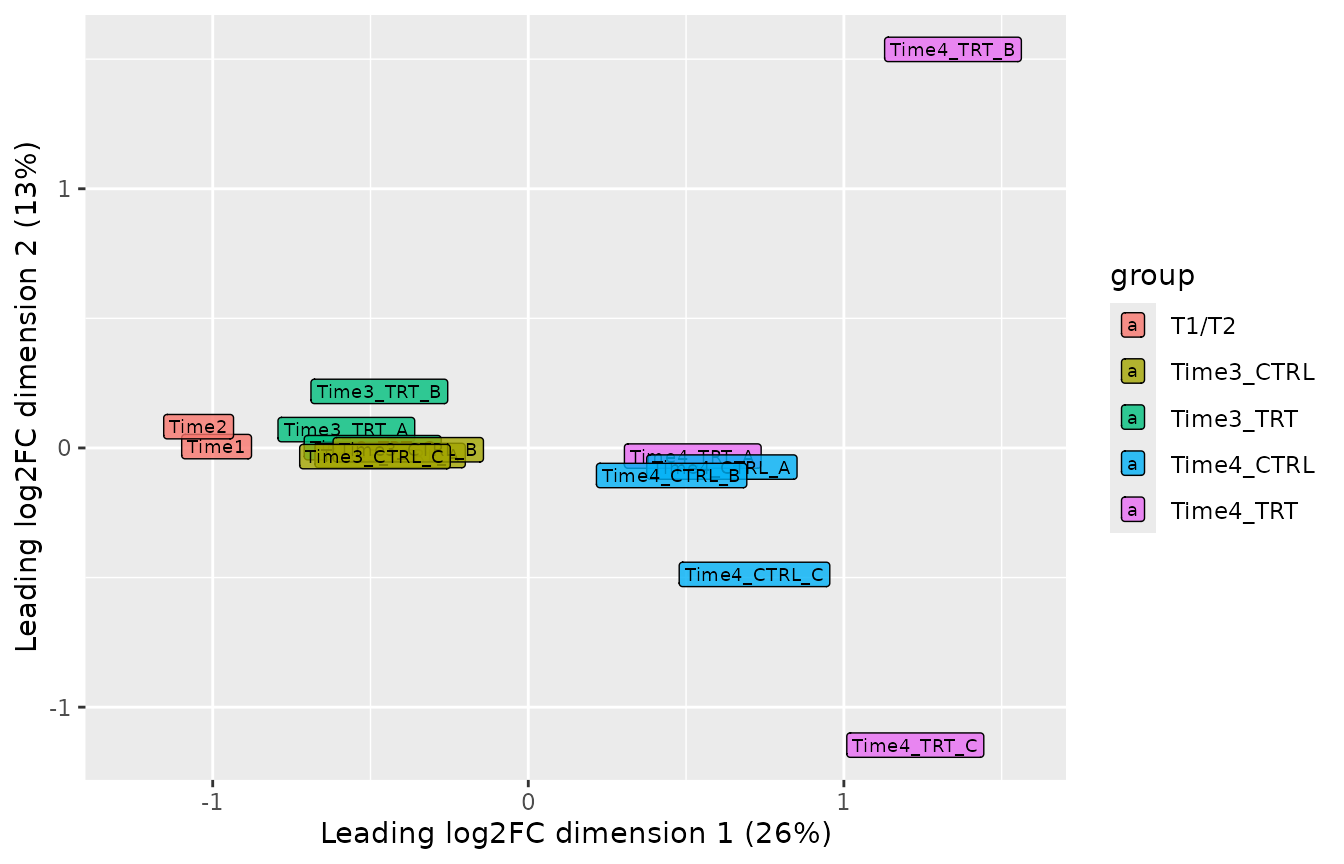
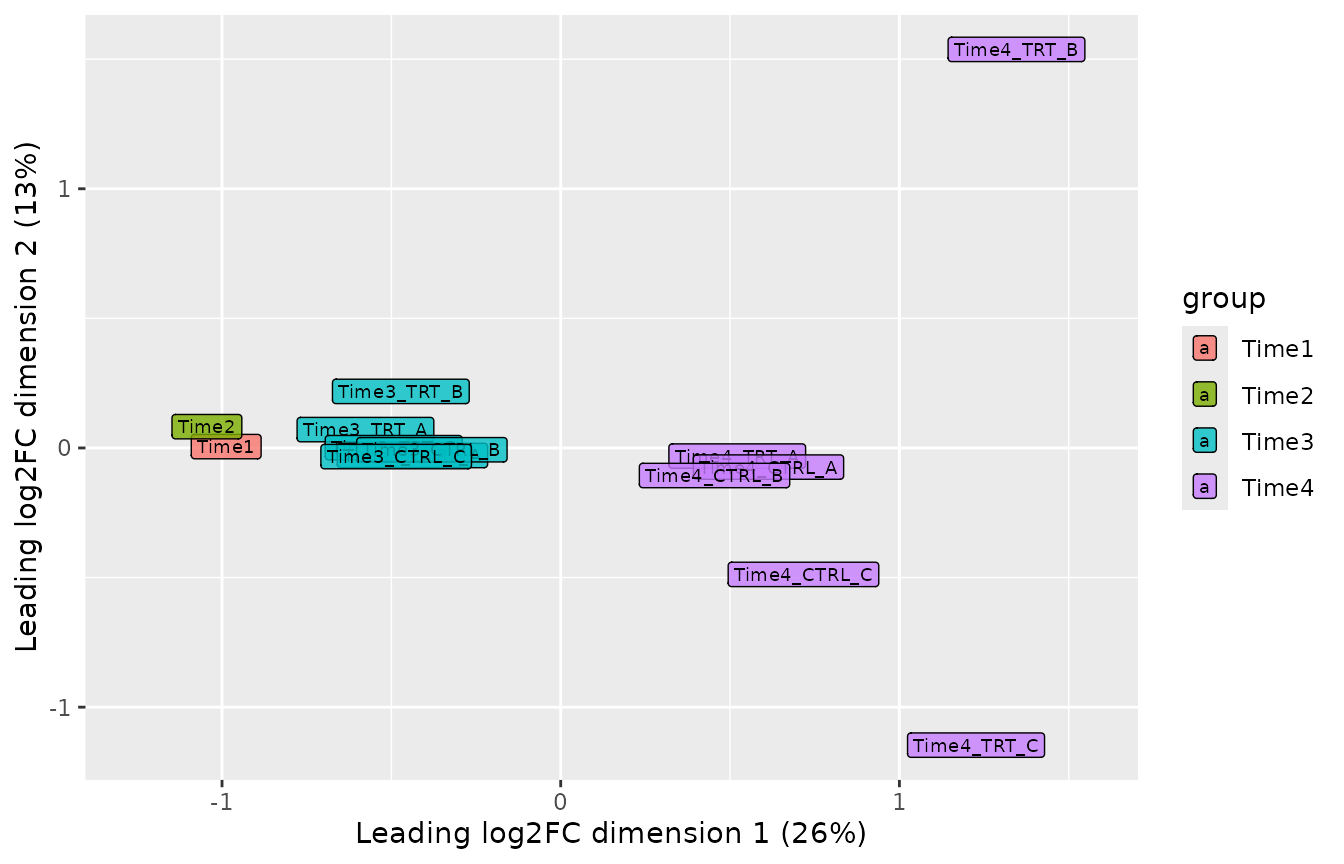
The groups argument colors the samples by any variable,
for example by treatment or by time point:
samples <- get_sample_table(object)

plot_mds(object, groups = factor(samples$Treatment))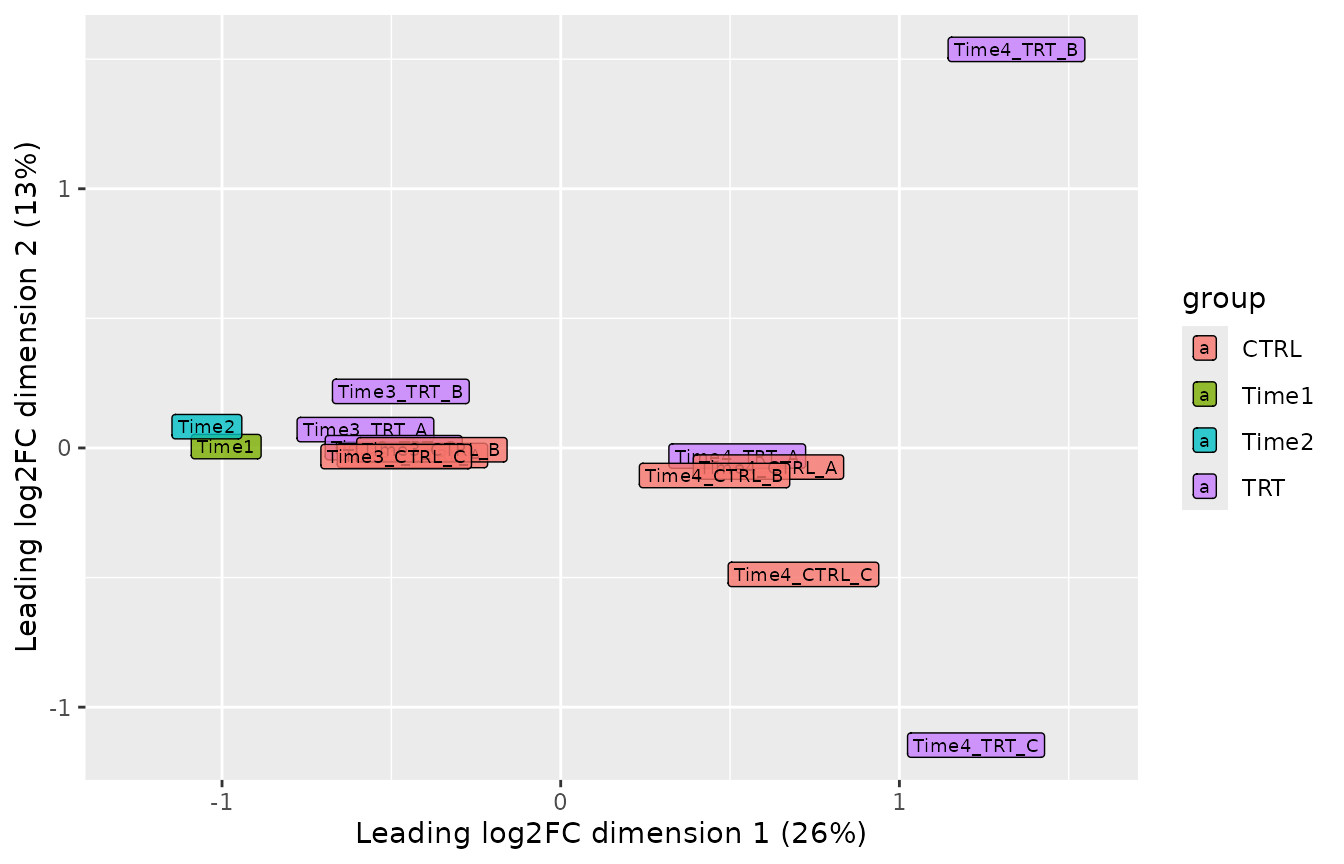
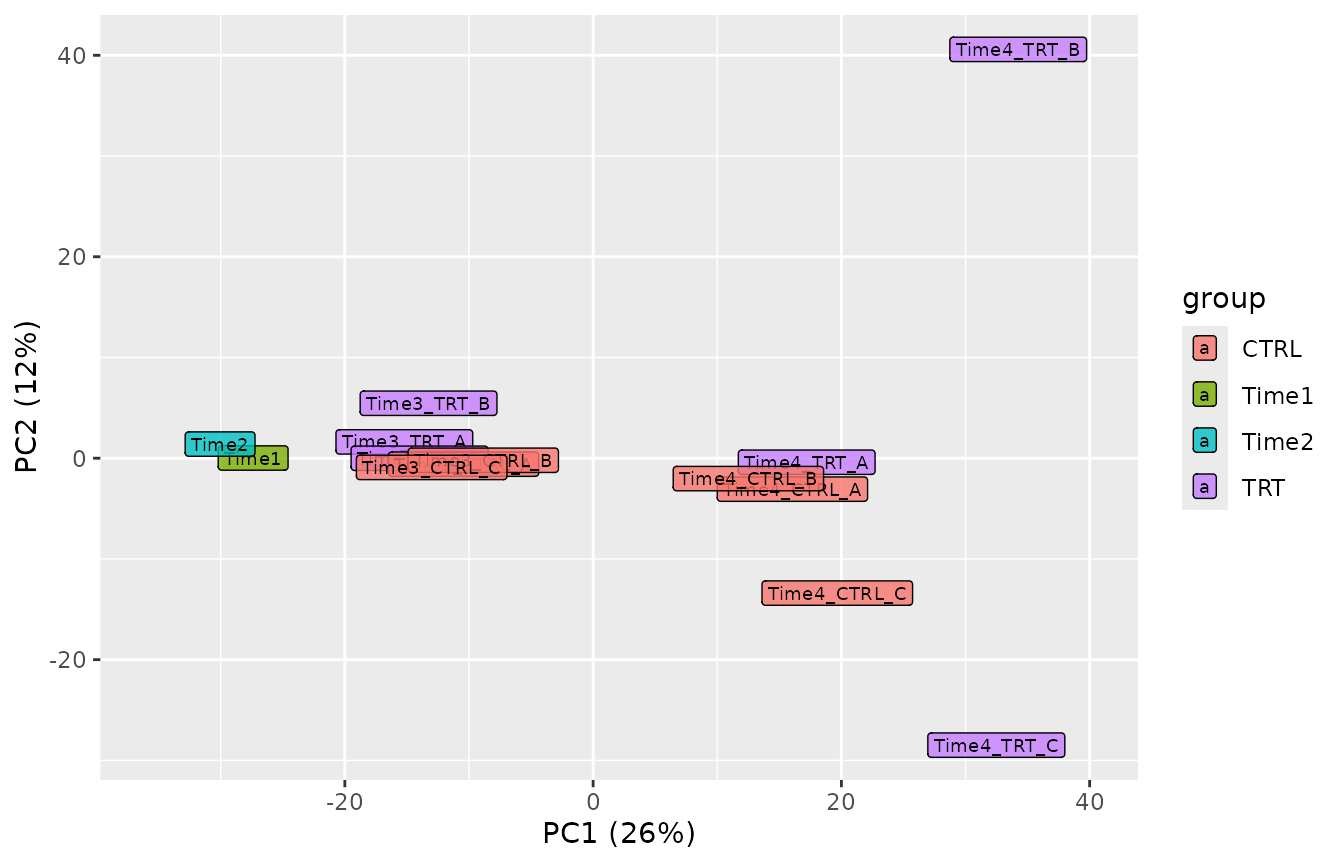
plot_pca() shows the samples on the components of a
principal component analysis of the log2 normalized counts (with the
normalization chosen in normalize_data()), with the share
of the variability each component explains on the axes;
components selects other components. Unlike the MDS, which
uses the most variable barcodes, it uses all of them, so the two plots
are a check of each other:
plot_pca(object)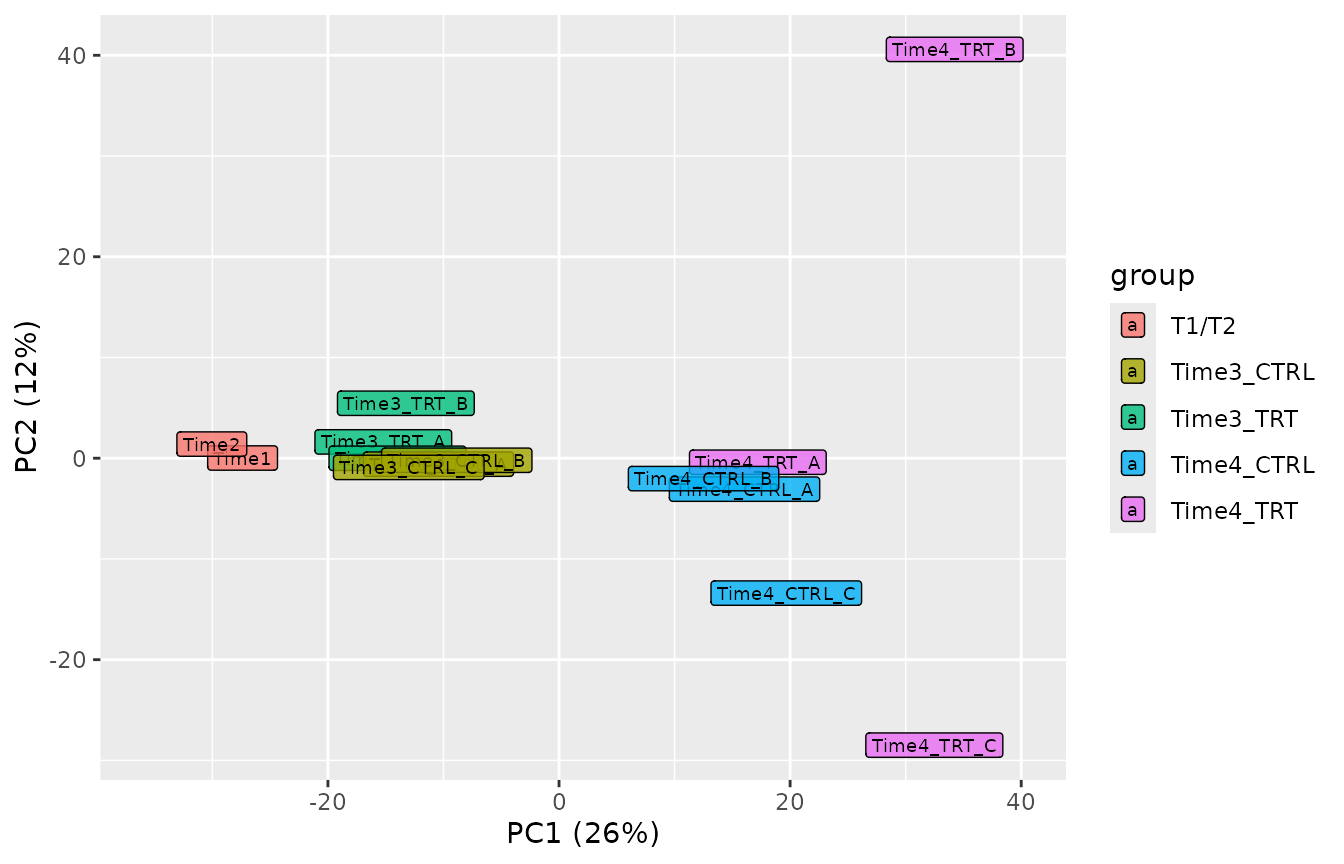
plot_explained_variance() shows how much of the
variability each principal component explains
(cumulative = TRUE for the cumulative proportion).
plot_explained_variance(object)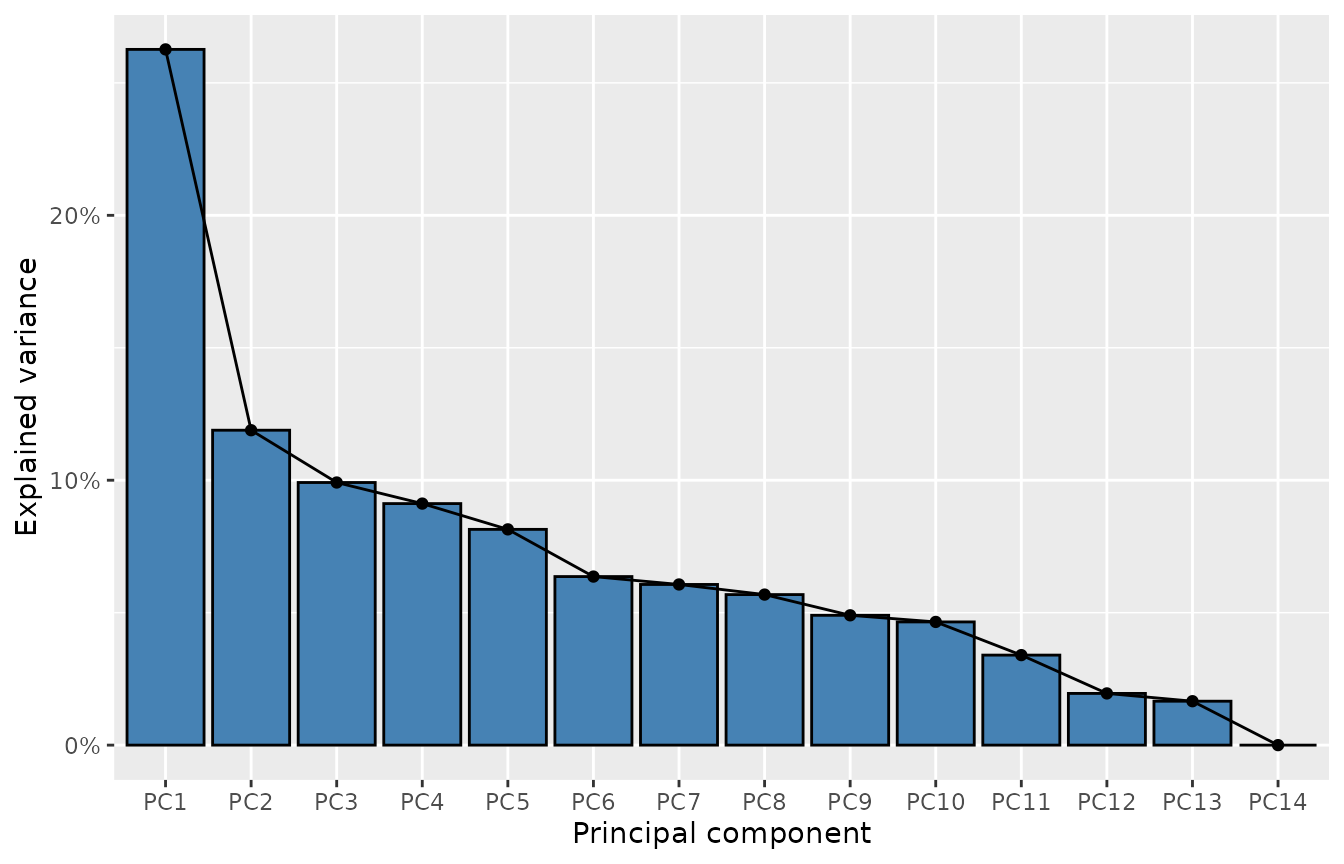
plot_explained_variance(object, cumulative = TRUE)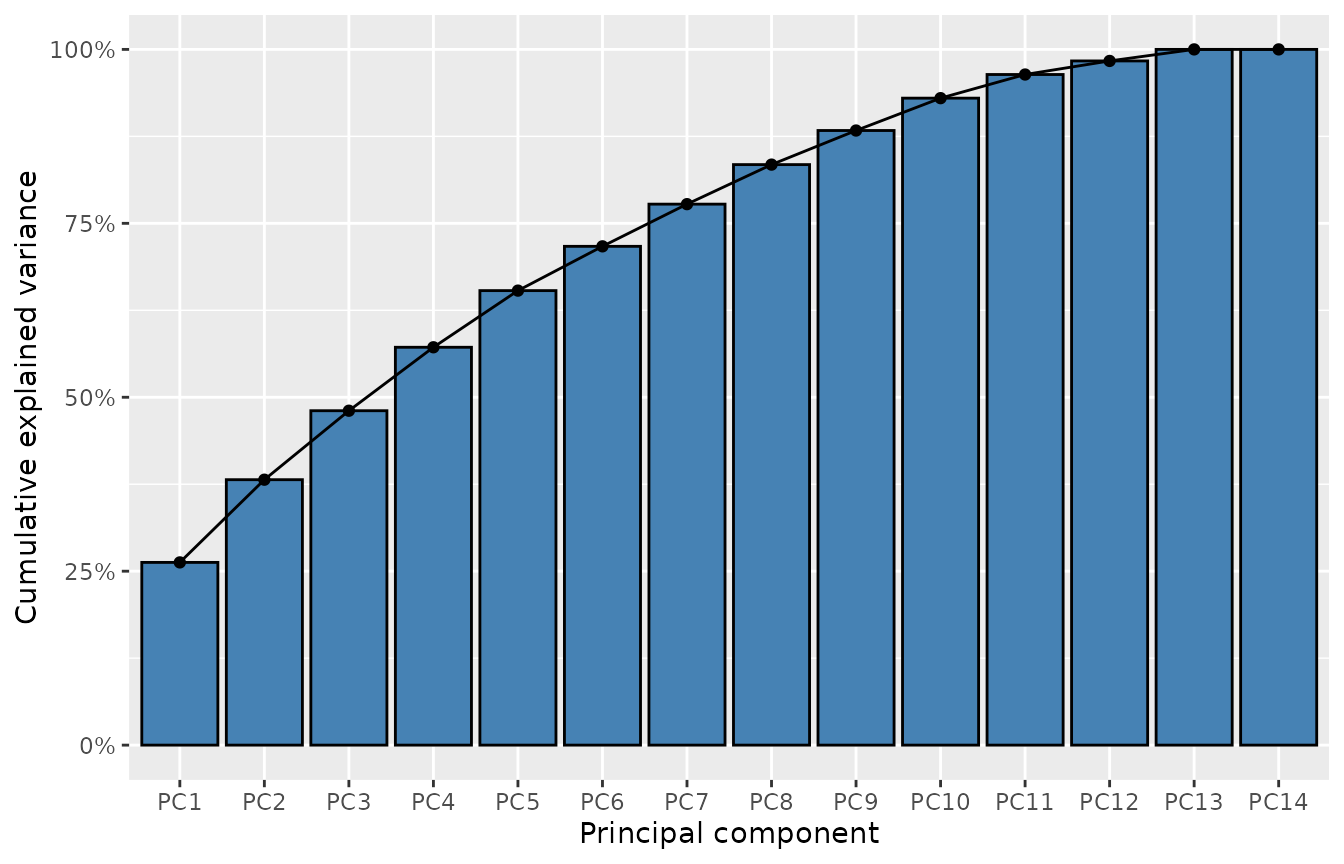
What to look for. Replicates should be close to each other. Samples usually separate first by time point (cells change as they grow) and then by treatment. A replicate far from its group is a candidate outlier.
In this dataset the samples separate by time point along the first
dimension, as expected. Two treated replicates at Time4,
Time4_TRT_B and Time4_TRT_C, are far from the
other samples along the second dimension; Time4_TRT_B also
has the most lost barcodes and the lowest correlations with the other
samples. They are worth a closer look. Removing a replicate should be
justified by a technical reason; otherwise keep it, and use the
replicate-aware methods of tutorial 3, which take this variability into
account.
Step 7: choosing the normalization
normalize_data() offers three methods:
| Method | Divides the counts of each sample by | Use it when |
|---|---|---|
"cpm" (default) |
Its total number of reads | Most screens |
"tmm" |
Its total number of reads, corrected with the edgeR TMM factors | Strong hits deplete a large part of the library, so the total is biased |
"control" |
The reads of control barcodes (e.g. non-targeting shRNAs) | The library has control barcodes that are not affected by the treatment |
A quick way to decide between "cpm" and
"tmm" is to compare them: if they agree, the default is
fine.
object_tmm <- normalize_data(object, method = "tmm")
# The normalized counts are the raw counts divided by the effective library
# sizes, so their ratio is the inverse ratio of the sizes
ratio <- get_normalization(object)$effective_library_size /
    get_normalization(object_tmm)$effective_library_size
tibble(Sample = names(ratio), TMM_over_CPM = round(ratio, 3))
#> # A tibble: 14 × 2
#>    Sample       TMM_over_CPM
#>    <chr>               <dbl>
#>  1 Time1               0.983
#>  2 Time2               0.997
#>  3 Time3_TRT_A         0.998
#>  4 Time3_TRT_B         0.987
#>  5 Time3_TRT_C         0.998
#>  6 Time3_CTRL_A        0.983
#>  7 Time3_CTRL_B        0.982
#>  8 Time3_CTRL_C        0.992
#>  9 Time4_TRT_A         1.01
#> 10 Time4_TRT_B         1.02
#> 11 Time4_TRT_C         1.02
#> 12 Time4_CTRL_A        1.00
#> 13 Time4_CTRL_B        1.01
#> 14 Time4_CTRL_C        1.01
Here the two methods differ by at most about 2%, so we keep the
default. With control barcodes the call would be
normalize_data(object, method = "control", control_barcodes = my_controls),
where my_controls is the vector of their identifiers.
The normalization is used by the whole analysis: the frequencies, the
Z-scores, the plots and the edgeR/limma based methods of tutorial 3
(CAMERA, ROAST, FRY), which model the raw counts with the effective
library sizes as offsets. Changing it with normalize_data()
takes effect at once everywhere. get_normalization() shows
the method in use.
Checklist
The next tutorial, 3. Finding and validating hits, uses this object.
sessionInfo()
#> R version 4.6.1 (2026-06-24)
#> Platform: x86_64-pc-linux-gnu
#> Running under: Ubuntu 26.04.1 LTS
#>
#> Matrix products: default
#> BLAS:   /usr/lib/x86_64-linux-gnu/openblas-pthread/libblas.so.3
#> LAPACK: /usr/lib/x86_64-linux-gnu/openblas-pthread/libopenblasp-r0.3.32.so;  LAPACK version 3.12.0
#>
#> locale:
#>  [1] LC_CTYPE=C.UTF-8       LC_NUMERIC=C           LC_TIME=C.UTF-8
#>  [4] LC_COLLATE=C.UTF-8     LC_MONETARY=C.UTF-8    LC_MESSAGES=C.UTF-8
#>  [7] LC_PAPER=C.UTF-8       LC_NAME=C              LC_ADDRESS=C
#> [10] LC_TELEPHONE=C         LC_MEASUREMENT=C.UTF-8 LC_IDENTIFICATION=C
#>
#> time zone: UTC
#> tzcode source: system (glibc)
#>
#> attached base packages:
#> [1] stats     graphics  grDevices utils     datasets  methods   base
#>
#> other attached packages:
#> [1] ggplot2_4.0.3    dplyr_1.2.1      ScreenR_1.15.16  BiocStyle_2.40.0
#>
#> loaded via a namespace (and not attached):
#>  [1] SummarizedExperiment_1.42.0 gtable_0.3.6
#>  [3] xfun_0.62                   bslib_0.12.0
#>  [5] htmlwidgets_1.6.4           Biobase_2.72.0
#>  [7] lattice_0.22-9              vctrs_0.7.3
#>  [9] tools_4.6.1                 generics_0.1.4
#> [11] stats4_4.6.1                tibble_3.3.1
#> [13] pkgconfig_2.0.3             Matrix_1.7-5
#> [15] RColorBrewer_1.1-3          S7_0.2.2
#> [17] desc_1.4.3                  S4Vectors_0.50.3
#> [19] lifecycle_1.0.5             compiler_4.6.1
#> [21] farver_2.1.2                stringr_1.6.0
#> [23] textshaping_1.0.5           statmod_1.5.2
#> [25] Seqinfo_1.2.0               htmltools_0.5.9
#> [27] sass_0.4.10                 yaml_2.3.12
#> [29] tidyr_1.3.2                 pillar_1.11.1
#> [31] pkgdown_2.2.1               jquerylib_0.1.4
#> [33] DelayedArray_0.38.2         cachem_1.1.0
#> [35] limma_3.68.5                abind_1.4-8
#> [37] tidyselect_1.2.1            locfit_1.5-9.12
#> [39] digest_0.6.39               stringi_1.8.9
#> [41] purrr_1.2.2                 bookdown_0.48
#> [43] labeling_0.4.3              fastmap_1.2.0
#> [45] grid_4.6.1                  cli_3.6.6
#> [47] SparseArray_1.12.3          magrittr_2.0.5
#> [49] patchwork_1.3.2             S4Arrays_1.12.1
#> [51] utf8_1.2.6                  withr_3.0.3
#> [53] edgeR_4.10.7                scales_1.4.0
#> [55] rmarkdown_2.32              XVector_0.52.0
#> [57] matrixStats_1.5.0           otel_0.2.0
#> [59] ragg_1.5.2                  evaluate_1.0.5
#> [61] knitr_1.52                  GenomicRanges_1.64.0
#> [63] IRanges_2.46.0              rlang_1.3.0
#> [65] glue_1.8.1                  BiocManager_1.30.27
#> [67] BiocGenerics_0.58.1         jsonlite_2.0.0
#> [69] R6_2.6.1                    MatrixGenerics_1.24.0
#> [71] systemfonts_1.3.2           fs_2.1.0